


Summary of Our Webinar Held on June 24, 2026
Your team at Financial Journey Partners has been using AI extensively to better serve all our clients. We have attended training sessions from some of the leading experts in our industry to teach us how to best use AI and keep our clients’ information safe. We have learned a lot during this process. On June 24, 2026, Scott led a webinar to share our key learnings with our clients. In the webinar, Scott noted, “In my lifetime, there have been 3 technologies that have transformed my daily life. First was the internet. Second was the iPhone, third is AI.”
The value has been real for us. Work that once took hours, from research and analysis to preparing client materials, now takes minutes, and the time we get back goes where it belongs: with you. We have come to see AI not as a passing trend but as a skill, one that rewards deliberate practice the same way any craft does. This recognition is why we decided to host a webinar on this topic, and why we wrote this blog: so you can capture that same value in your own life.
This month our blog is a recap of the key points from our webinar to help you learn how to use AI more effectively. We use ChatGPT and Claude the most, so we focus on these two AI programs. If you are new to AI, you are in good company: when we polled our webinar attendees, about half were also just getting started.
This recap sets the context for each topic and points you to the exact moment in the webinar replay where Scott goes deeper. Throughout the blog, you will see timestamps like (replay, 15:12). Each one tells you where to find that topic in the video.
In this blog, we will discuss the following:
- Common AI Programs
- What is ChatGPT?
- Introduction to Prompting
- A Complete Framework for Prompting: RTF plus STQ Plus Context
- Levels of AI Use
- Evolution of Adopting AI
- Important Issues to Consider
- What is AI Iteration?
- A Client's Story
- FJP Uses for AI
- ChatGPT Free vs Plus ($20/month)
- Common Ways You can Use AI
- Getting the Most Out of AI
- Fun Exercise
Sign up for our email newsletter for views of the economy, stock market, and top news stories from our Wealth Managers at Financial Journey Partners.
Common AI Programs
AI programs are available from a number of different companies, and new ones seem to arrive every month. Here are six of the most commonly used.
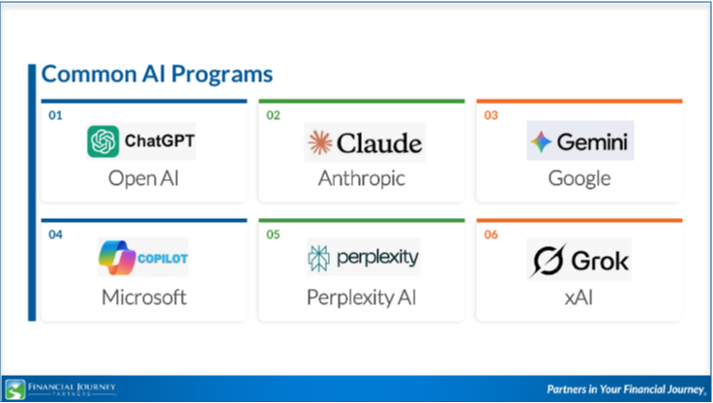
The most important point to make is that these six programs are NOT all the same. Their capabilities, strengths and weaknesses vary considerably, so it is important to pick the AI program that can best complete your specific task. We have chosen to use ChatGPT and Claude. In short, ChatGPT is the strong all-arounder for general use, workflows, content and strategy. Claude excels at writing quality, long documents and reliable outputs, which makes it well suited for research, analysis and compliance heavy work. We have found these tools are also great for designing your next trip, researching options for a home remodel, or even fact-checking something you heard on TV or through the internet. In the replay, Scott walks through the pros, cons and best use case for all six programs, as evaluated by ChatGPT itself (replay, 15:12).
What is ChatGPT?
The easiest way to understand ChatGPT is to think of it as a conversation. You ask a question in plain English, and it answers in plain English: no technical background, no special commands to learn. It drafts documents, summarizes complex information, creates structured plans, and rewrites content on demand. We think of it as a thinking partner, one that explores ideas with the user, compares options, pressure-tests your reasoning, and suggests angles you may not have considered (replay, 18:34).
Just as important is what ChatGPT is not. It is not always accurate, so review its responses before you act on them. It is not a substitute for professional financial, legal or medical advice; it carries no license and no fiduciary duty. And it has no access to your accounts, documents, or private information unless you paste that information into the conversation yourself. (To prevent fraud and information theft, please do not put any account numbers, Social Security numbers, or other confidential information into AI tools.)
Getting started takes about two minutes. On a computer, open your web browser and go to chatgpt.com. On your phone, download the free ChatGPT mobile app. Ask your question, read the response, then, if needed, ask a follow-up or rephrase to get a better answer. One tip worth knowing: the Personalization setting lets you tell ChatGPT the style and tone you prefer, and it will remember your preferences across all your conversations (replay, 21:55).
Introduction to Prompting
If you walk away from the webinar with one new word, make it this one: prompting. A prompt is your question or instruction to the AI, and the quality of what you get back depends heavily on the quality of what you put in. The AI does not know what you want unless you tell it.
Prompting is different from doing a Google search. A Google search averages 2 to 3 keywords, returns a list of links, and leaves you to navigate the results. A good AI prompt runs 15 to 40 words, gives directions in sentence form, and generates a narrative response. The better your question, the better your answer (replay, 23:56). We have found that investing 30 seconds in a better prompt can save 5 minutes of back-and-forth refinement.
A Complete Framework for Prompting: RTF plus STQ plus Context
The heart of the webinar is a prompting framework you can keep in front of you whenever you use AI. It has seven elements: Role, Task, Format, plus Style, Tone, Questions, plus Context. Here is the framework at a glance, including an example prompt that pulls all seven elements together:
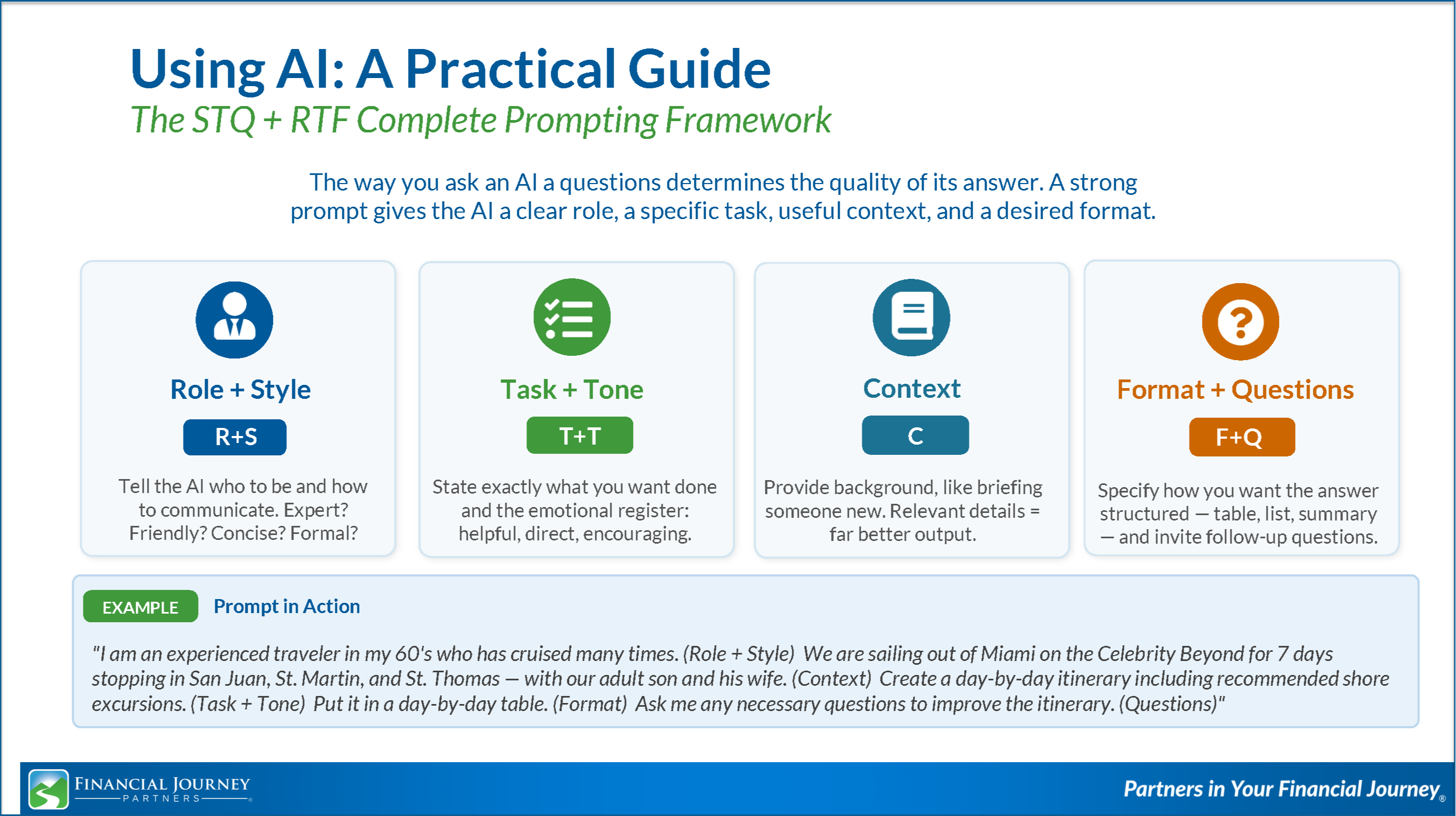
Scott builds this framework piece by piece in the replay, with examples for each element (replay, 25:51). Rather than repeat it all here, we have created the above one-page summary you can download, print, and keep beside you as you work.
DOWNLOAD PROMPTING FRAMEWORK
Levels of AI Use
Over the past few years, we have noticed that the way we use AI evolves through three levels, and we see the same pattern with our clients.
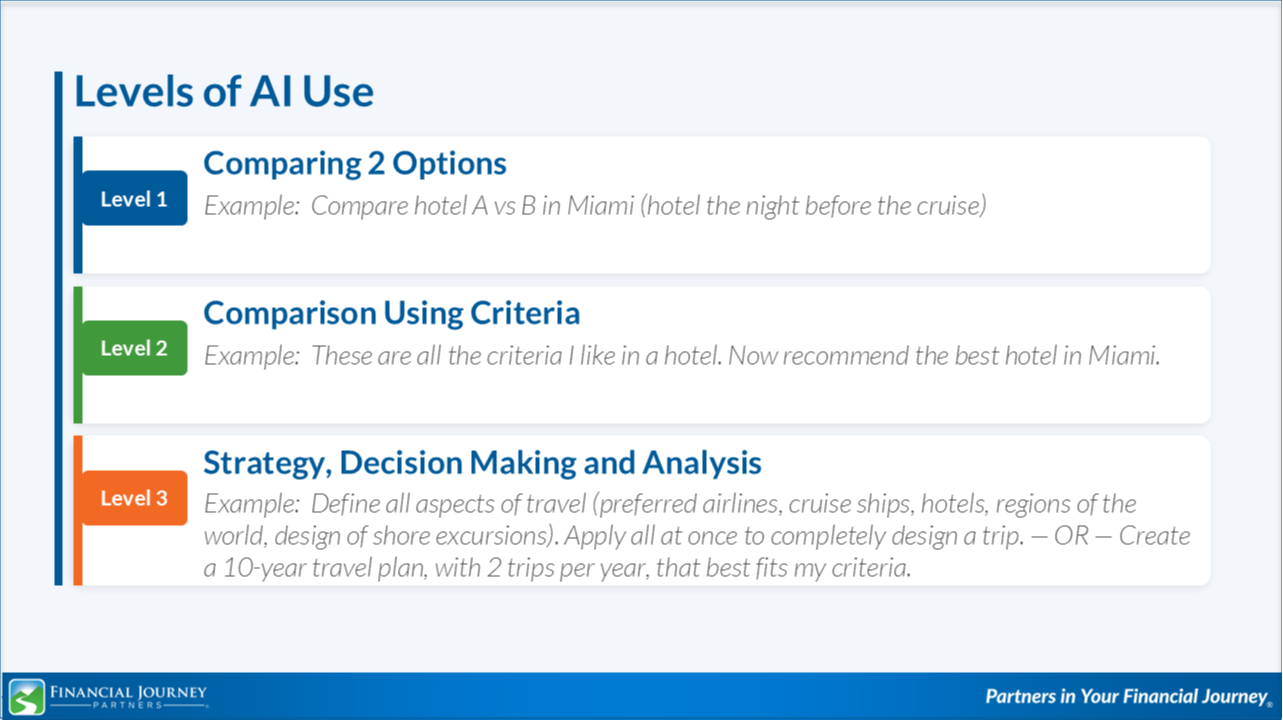
Where AI has the most power is Level 3: strategy, decision making and analysis. Scott shares how he created a document called Scott’s Travel Preferences, covering his preferred airlines, cruise ships, hotels and regions of the world. Now, when he applies those preferences to a potential trip, AI designs the entire itinerary in about 30 seconds, work that used to take hours (replay, 33:24).
Evolution of Adopting AI
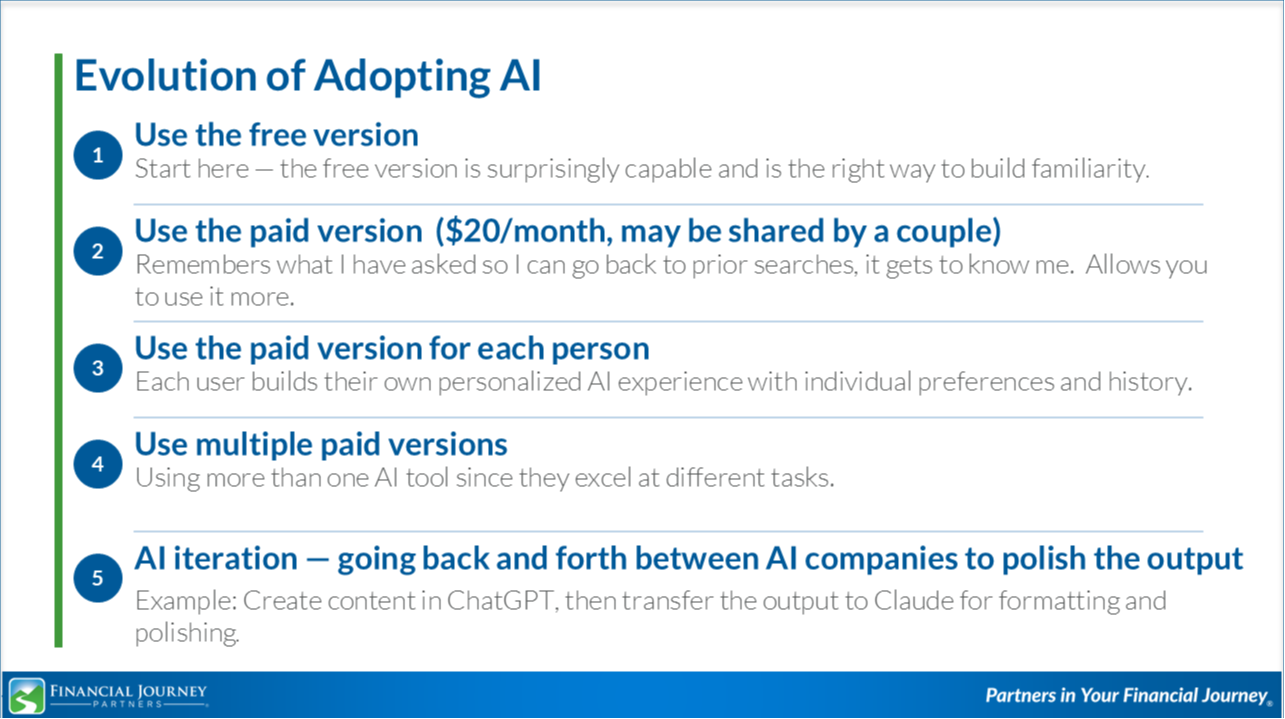
The way we adopt AI tends to follow a pattern as well: start with the free version, upgrade to a paid version (sometimes shared as a couple), move to a paid version for each person, and eventually use multiple AI programs, each chosen for what it does best (replay, 36:08).
Important Issues to Consider
Like any powerful tool, AI calls for care. Here are the things we watch for in our own use, and think you should too (replay, 37:51).
- Incorrect information: AI can produce confident sounding but incorrect information, a phenomenon called "hallucination." Before acting on any important fact, verify it from a primary source. At FJP, we always review AI information for accuracy.
- Avoid over-reliance for high-stakes decisions: For decisions involving your finances, health, or legal matters, AI can inform your thinking, but it should not replace the judgment of qualified professionals.
- Privacy and security: Never load confidential information such as Social Security numbers, account numbers or passwords into AI. Treat every input as potentially public (replay, 38:46).
- Uploading information: Avoid dragging and dropping files from your hard drive. Copy and paste the information instead, or upload files from a dedicated folder, such as one called AI on your desktop, that holds only copies of what you intend to share, rather than from your everyday folders.
- Know the limitations: Three are worth remembering. AI training has a cutoff date, so always verify time-sensitive information. it lacks personal context about your financial position, family situation, or your life goals unless you tell it. And it is eager to please: it tends to agree with you, so when you are weighing up a real decision, ask it to argue the other side (replay, 40:25).
- Common mistakes: Generic questions produce generic answers. Treat the first response as a draft: verify it, refine it, and follow up. Most of the value comes from iterating (replay, 41:12).
What is AI Iteration?
AI iteration is taking the output of one AI program and moving it to a second AI program to improve the result. One program may get you 80% of what you need. Uploading that output to a second program may take you to 95%, and moving it back to the first may get you to 100% (replay, 42:15). Two examples from the webinar show why this matters.
When Scott was planning the 2027 FJP Adventures Group Cruise to New England and Canada, ChatGPT produced an itinerary that was factual and functional, and looked like this.

Then Scott uploaded that output to Claude, along with our FJP branding guidelines, and asked it to format the itinerary in our branded colors and fonts. The result looked like this (replay, 43:01).
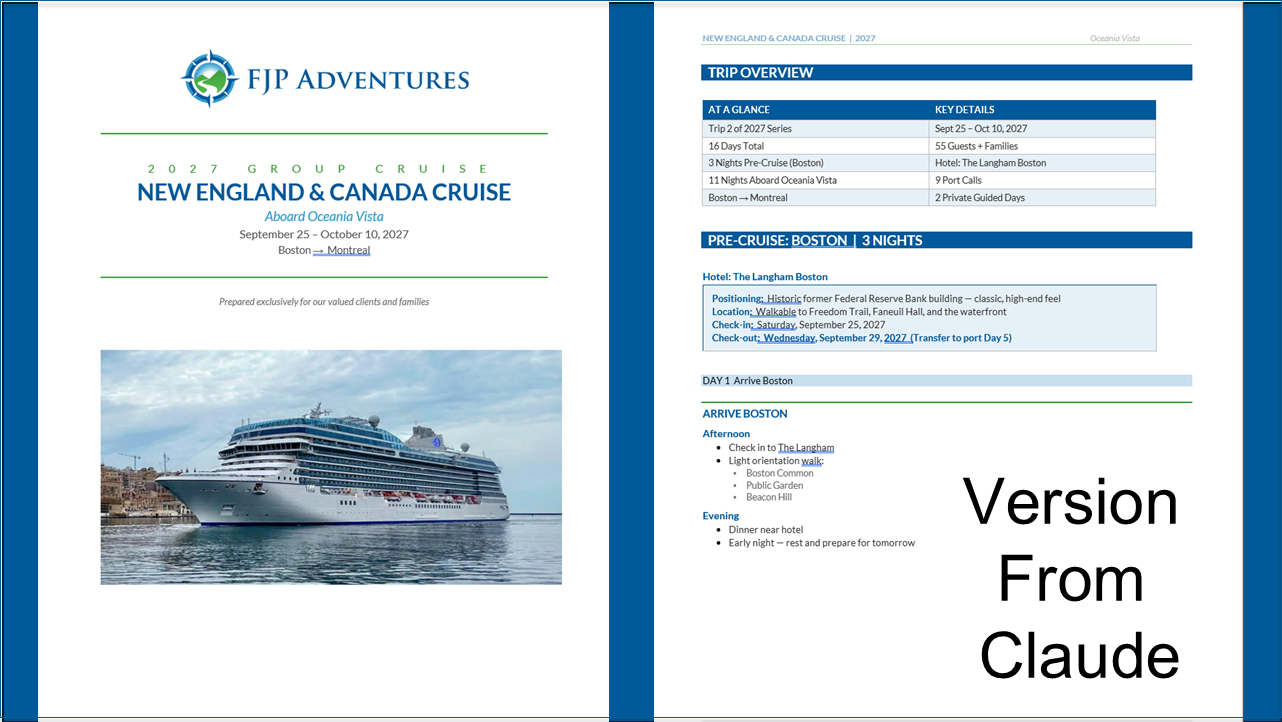
Clearly the output from Claude was far superior. But before you decide to drop ChatGPT and move to Claude, consider the second example. As many of you know, Elaine and Scott are in the middle of renovating their home. This is a recent picture of the house, mid-renovation.

Scott loaded all the specifications for the exterior design, including paint color, windows, front door, garage door and exterior lighting, and asked each program to create a picture of the finished home. Claude created this.

This picture left us laughing pretty hard. Then we made the same request to ChatGPT, which produced this (replay, 44:46).

The picture from ChatGPT is not perfect, but it is a vast improvement over the picture from Claude. Claude was far better for one task, and ChatGPT was far better for the other. Not all AI programs are created equal. What matters is selecting the AI program that does the best job for what you want it to do.
We encourage you to experiment with at least two AI programs. In our experience working with both tools, sometimes Claude produces better imagery and graphics than ChatGPT. Other times, ChatGPT does it better.
Enjoying the Journey: A Client Story
One of our clients, Laura, joined the webinar to share how she has been using AI in her own life. We could summarize it here, but her story is worth hearing in her own words (replay, 45:57).
FJP Uses for AI
Your team at FJP uses ChatGPT and Claude all day long, every day (replay, 47:33). The ways we use AI include the following.
We have found significant productivity improvements and better-informed results from using AI, so we can do a better job of serving all our clients. Even the slides for this webinar were created with AI and, of course, fact-checked and modified by FJP. The same is true of this blog. It enables us to write more clearly and provide as much value as possible to you.
ChatGPT Free vs. Plus ($20/month)
Both ChatGPT and Claude are currently $20/month for the first level of the paid version. Here are some differences between the free and Plus versions of ChatGPT, and Scott’s guidance on choosing between them (replay, 48:47).
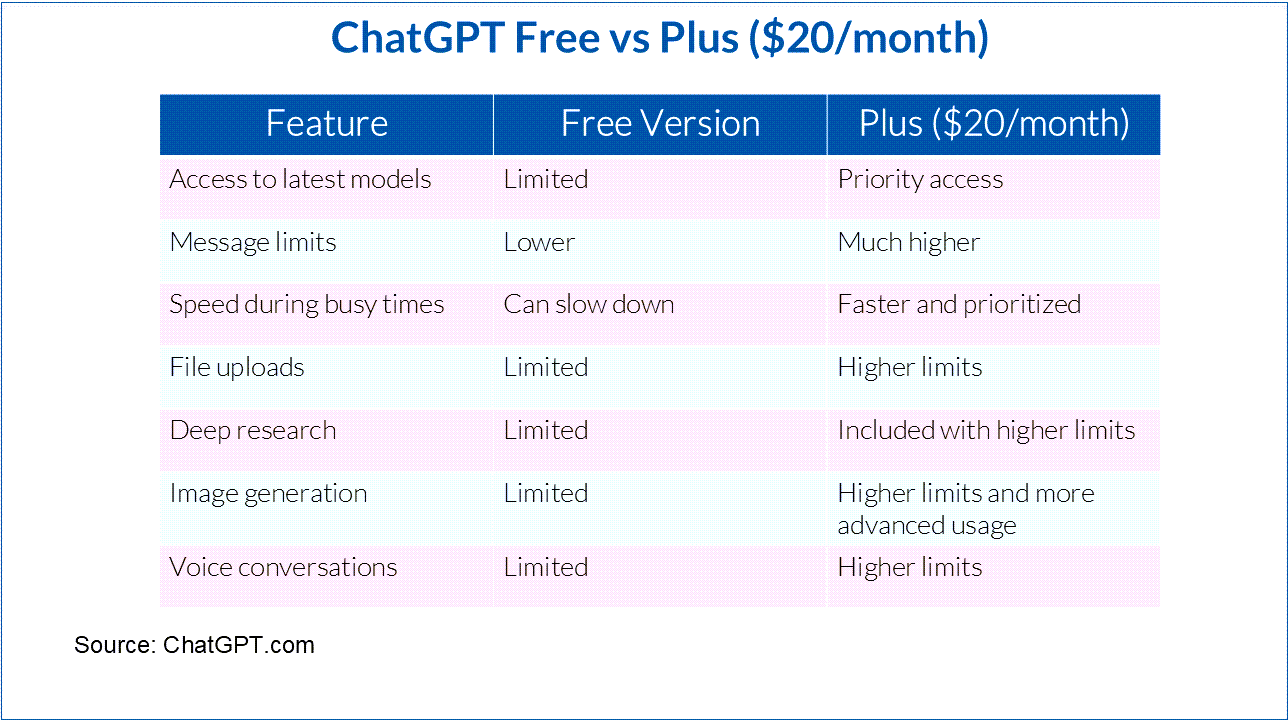
For us at FJP, we have chosen the paid versions of both ChatGPT and Claude. If you use AI a few times a week for simple questions, the free version may serve you well. If you upload documents, want longer conversations, or value speed and reliability, most of us find the Plus version worth the low cost.
Common Ways You Can Use AI
The ways to use AI are endless (replay, 50:30). Some of the most common uses in our everyday lives include:
- Major purchases: research cars, home improvements, appliances, and travel planning.
- Pros-and-cons lists: generate a structured pros-and-cons list for any significant decision.
- "First draft" thinking tool: use it as your personal first draft thinking tool before sharing an idea or decision with others.
- Customized checklists: create checklists for tasks such as home maintenance, year-end planning, travel prep, medical appointments, and event planning.
- Planning complex projects: plan projects or events with a structured, step-by-step task breakdown, from home renovations to family reunions.
Getting the Most Out of AI
We have covered a lot. Here are a few habits that help us get the most out of AI (replay, 52:14).
- Paid version: consider the paid version for each user so you can fully personalize it to your needs.
- Personalization: if using ChatGPT, use the Personalization setting to customize it to your preferences.
- Effective prompting: remember Role, Task, Format, Style, Tone, Questions, plus Context for the best possible results.
- Projects: with ChatGPT and Claude, you can organize your work using Projects.
- Save often: tell ChatGPT and Claude to save your work often to create a new baseline. They do not automatically save your work.
- App: the ChatGPT phone app allows you to ask questions on the go, by voice or text.
DOWNLOAD PROMPTING FRAMEWORK
If you are already using AI, we hope you have found a few tips here that will help you get even more out of it. If you are new to AI, we hope you decide to jump in and give it a try. You can use the free version of ChatGPT or Claude to get started. AI can do amazing things, and we think it can help enrich many areas of your life.
Fun Exercise
Let’s finish with a fun exercise. The team members at FJP have done this exercise and found it enlightening and entertaining (replay, 54:52). Ask whichever AI program you are using the following question:
“Tell me 5 things about myself that I may not know about myself.”
We would love it if you shared the results of this question with your Wealth Manager the next time you talk with them!
If you are a client of FJP and have questions about your financial plan, how to align your money with your purpose, or simply want to talk through what matters most to you, contact your Wealth Manager, Elaine Manley, Scott Manley, Linda Tjiputra, we love hearing from you and are happy to talk.

The information being provided is strictly as a courtesy. When you link to any of the websites provided here, you are leaving this website. We make no representation as to the completeness or accuracy of information provided at these websites. Nor is the company liable for any direct or indirect technical or system issues or any consequences arising out of your access to or your use of third-party technologies, websites, information, and programs made available through this website. When you access one of these websites, you are leaving our website and assume total responsibility and risk for your use of the websites you are linking to.
Investment advisory services offered through Mutual Advisors, LLC DBA Financial Journey Partners, an SEC Registered Investment Adviser. Securities offered through Mutual Securities, Inc., Member FINRA/SIPC. Mutual Securities, Inc. and Mutual Advisors, LLC are affiliated companies.